English Keyboard Layout Chart – Best for Touch Typing Practice

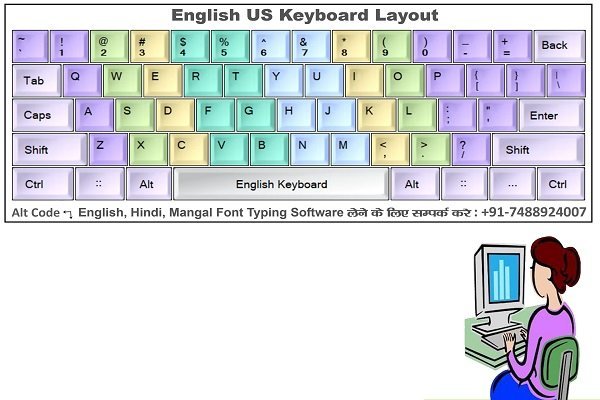
  • 🎨 Color-Coded Fingers: Exact keys are highlighted with different colors for each specific finger.

  • 🖨️ Print-Ready PDF: High-quality format that you can easily print on a standard A4 size paper.

  • 🏛️ Exam Focused: The most essential reference chart for SSC, CPCT, and Beltron exam aspirants.

  • 🚀 Perfect for Beginners: The very first step to learning touch typing and building strong muscle memory.

Original price was: ₹99.00.Current price is: ₹50.00.

Description

If you want to crack any government typing exam, the first rule is simple: Do not look at the keyboard! To achieve fast and accurate touch typing, having a proper English Keyboard Layout Chart is absolutely essential. This chart teaches you exactly which finger belongs on which key, helping you build a solid foundation and automatically boosting your typing speed over time.

Why You Need This English Keyboard Layout Chart?

When learning how to type, it is very common to develop bad habits early on. Once you get used to typing with the wrong fingers, reaching the standard exam speed of 35-40 WPM becomes extremely difficult. Our color-coded English Keyboard Layout Chart eliminates this problem completely.

English Keyboard Layout Chart – Best for Touch Typing Practice

In this chart, keys are properly mapped according to each specific finger. All you need to do is print it out and place it right under your monitor for quick visual reference while practicing.

Key Benefits & Features

  • Scientific Color Coding: A complete visual map of the exact keys for all 10 fingers of your left and right hands. This helps build muscle memory quickly so you naturally remember key placements.

  • High-Resolution Quality: This English Keyboard Layout Chart is provided in a crystal-clear, high-quality, print-ready format. The printout will look sharp and easy to read on any standard A4 page.

  • Perfect for All Exams: A must-have practice tool for all students preparing for SSC CHSL, SSC CGL, MP CPCT, Bihar Beltron, and High Court clerical typing skill tests.

  • Boost Speed to 50+ WPM: Proper finger placement is the only proven way to push your typing speed above 50 WPM without making continuous formatting errors.

How to Use It?

  1. Download the PDF of this chart and take a color printout.

  2. Stick the printout on the wall behind your monitor or place it right next to your screen.

  3. Whenever you practice typing, look at this chart instead of looking down at your physical keyboard, and make sure your fingers rest on the correct home-row keys.

  4. Within a few days of consistent practice, you will memorize all the keys and start typing like a professional.

(Download your chart today and start typing like a pro!)

Specification

Overview

Languages

Discounted Games

150,000+ Ultimate Adobe Lightroom Presets Bundle | Mobile & Desktop PC

Original price was: ₹2,999.00.Current price is: ₹99.00.

150,000+ Ultimate ChatGPT Prompts Mega Bundle

Original price was: ₹1,599.00.Current price is: ₹99.00.

675 GB Ultimate Graphic Design Assets Mega Bundle

Original price was: ₹1,999.00.Current price is: ₹99.00.

A Plague Tale: Requiem

Price range: ₹37.50 through ₹59.99

All-in-One Video Editing Assets & Graphic Design Mega Bundle

Original price was: ₹2,499.00.Current price is: ₹99.00.

Assassin’s Creed Mirage

49.99

Customer Reviews

0 reviews
0
0
0
0
0

There are no reviews yet.

Only logged in customers who have purchased this product may leave a review.